In short
- CMYK, 300 dpi
- trim size 150 × 330 mm, artwork with bleed 154 × 334 mm
- 2 mm bleed on every side
- keep content at least 5 mm from cut and crease lines
- keep the 85 × 120 mm calendar pad area free of important content
- single-page PDF, 4/0 print
Start from the die-cut template
Below the calculator there is a “Download template” button. The file has the trim size and shows the cut line (red) and the crease lines (yellow). Design on top of it and do not scale or move it. The diagram below shows what each area is.
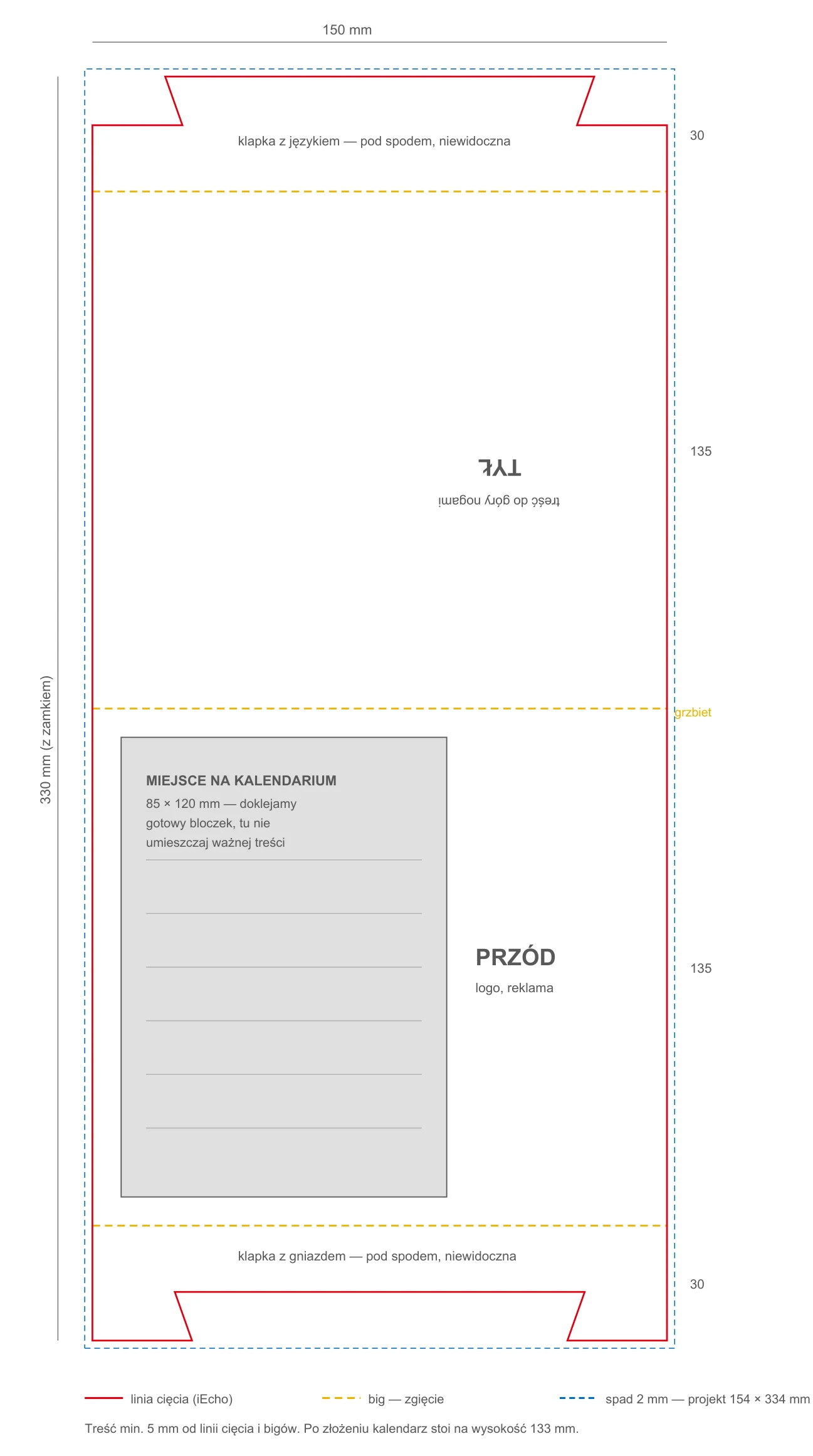
One sheet, four areas
The stand is made from one sheet folded in three places. From the top: tab with tongue (30 mm), back face (135 mm), front face (135 mm) and tab with slot (30 mm). The tabs meet underneath and lock, so any artwork on them is hidden. The back face lies upside down on the sheet. Rotate text placed there by 180°, otherwise it will read upside down once folded.
Space for the calendar pad
We glue a ready 2027 calendar pad onto the front face. It covers an 85 × 120 mm area, 7.5 mm from the left edge and 7.5 mm from the ridge (the middle crease). The background may run under the pad, but put your logo, contact details and text next to it. A strip of about 50 mm stays free to the right of the pad, and the whole back face is yours.
Keep clear of the creases
300 gsm board cracks slightly at the fold where it is printed. Do not run fine text, logos or sharp colour edges across a crease line. Leave at least 5 mm. Backgrounds can run across freely.
Bleed and colours
Extend backgrounds and edge elements 2 mm beyond the cut line. Use CMYK, set black text to C:0 M:0 Y:0 K:100, and outline or embed fonts. We print 4/0 on one-side coated 300 gsm board, on the coated outer side.